
Google Classroom
Google Classroom Agreement/ Remote Learning Policy
What is Google Classroom?
Google Classroom is an online platform, where teachers can upload learning activities for children to interact with and respond to via Google's online apps or by uploading their own material.
Our Google for Education platform offers a range of different apps and interactive features, which we plan to integrate into our practice once children return to school. However, its primary function at this time will be to store weekly home learning material for children to access and respond to.
How to access Google Classroom
To access Google Classroom, please follow the steps below:
1) Type in classroom.google.com into the address bar or search engine (clicking on the blue link or the icon at the top of the page will also take you straight to the login page).
2) Enter your child's unique username, which consists of a unique username (email address) and password. Please note, children's usernames and passwords have been sent to parents/ carers via SchoolComms.
USERNAME: joebloggs@dayslaneprimary.co.uk
PASSWORD: XXXX
Troubleshooting - If you already have a personal Google account (gmail), you will need to sign out of this before children can log onto Google Classroom, as this feature is only available for approved school accounts.
To sign out from your personal account, please follow the following steps:
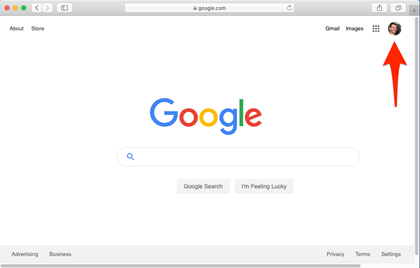
- Locate your profile picture in the top right hand corner of the screen (see image below).
- Click on the image to open a dropdown menu.
- Click "Sign out" on the bottom of the menu.
- Your child can then sign in with their school email address.
How To Add Another Google Account
How To Navigate Google Classroom
Submitting Work On Google Classroom
Joining A Google Meet Session
Google Classroom Agreement/ Remote Learning Policy
NO POLICY AVAILABLE ON OLD WEBSITE.
SPEAK WITH JO